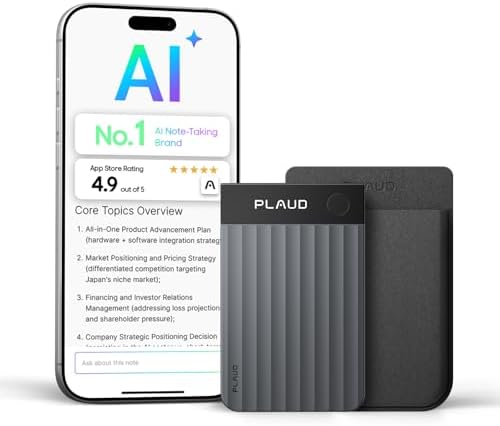
- ENHANCED CONTEXT WITH MULTIMODAL INPUT: Capture audio, type notes, add images, and press to highlight key moments for ri…
- CHAT WITH YOUR RECORDINGS USING “ASK Plaud”: Unlock deeper insights with this interactive AI. Ask questions, extract key…
- INTELLIGENT RECORDING WITH AI DIRECTIONAL AUDIO: Enjoy seamless, intelligent recording with Plaud Note Pro. Its AI autom…
Running a solo business in 2026 means wearing every hat at once — CEO, marketer, content creator, customer support rep, and bookkeeper. The solopreneurs who are winning aren’t the ones working harder. They’re the ones who built smarter AI stacks that handle the 80% of work that doesn’t need their brain.
AI tools for solopreneurs are software platforms that use artificial intelligence to automate non-revenue-generating tasks — email triage, content creation, scheduling, customer support, and bookkeeping — so a solo operator can focus on strategic, high-value work. In 2026, a complete solopreneur AI stack costs between $75 and $150 per month, delivering capabilities that previously required a team of 5–10 people. According to MBO Partners’ State of Independence report, over 41.8 million Americans now operate as solopreneurs, and the ones leveraging AI are reporting 2–3x higher revenue per hour worked compared to those still relying on manual workflows.
I’ve spent months testing these tools on workborn.com and across the solopreneur projects I follow closely. This guide covers the 13 tools that actually move the needle — organized by category, with honest pricing, real limitations, and the exact ROI you can expect from each one.
Quick navigation:
- AI Writing & Content Tools
- Automation Tools
- CRM & Customer Management
- Productivity & Scheduling
- Design & Visual Content
- Video & Multimedia
- Monetization Tools
- How to Build Your Stack
- FAQ
Why Solopreneurs Need AI Tools More Than Anyone
The math is brutal. A solopreneur spending 3–5 hours per week on email, 1–2 on scheduling, 2–4 on content creation, and 1–2 on bookkeeping loses 7–13 hours weekly to admin work. That’s 364–676 hours per year — the equivalent of 9–17 weeks of full-time work — on tasks that generate zero direct revenue.
McKinsey’s research on generative AI shows that knowledge workers using AI tools save an average of 5.6 hours per week, with founders and managers saving closer to 7–8 hours. For solopreneurs, those recovered hours translate directly into revenue-generating activities: client acquisition, product development, and strategic thinking.
The competitive gap is real and growing. Solopreneurs who automate intelligently are now operating at the efficiency level of 5–10-person teams — without the overhead, management complexity, or payroll.
AI Writing & Content Tools
Content is the primary growth engine for most solopreneurs — blog posts, newsletters, social media, email sequences, landing pages. These tools handle the heavy lifting.
1. ChatGPT (OpenAI) — Best All-Around AI Assistant
Pricing: Free (GPT-4o Mini) | $20/month (Plus — GPT-5.4)
Best for: Blog drafts, email writing, research, brainstorming, customer personas
ChatGPT remains the most versatile tool in any solopreneur stack. In 2026, GPT-5.4 delivers significantly improved reasoning and instruction-following compared to earlier versions. The free tier covers 80% of use cases. The $20/month Plus plan removes rate limits and unlocks image generation, web browsing, and advanced data analysis.
Real use case: Turn a 2,000-word blog post into 10 social media posts, 3 email newsletter segments, and a LinkedIn article — in under 20 minutes. That’s content repurposing that used to require a VA or content manager.
Limitation: No native integration with your email, calendar, or business tools. Requires copy-paste workflows for most tasks.
For a deeper dive, see our guide to AI writing tools for solopreneurs.
2. Claude (Anthropic) — Best for Long-Form & Deep Analysis
Pricing: Free | $20/month (Pro)
Best for: Long-form content, document analysis, complex reasoning, nuanced copywriting
Claude has become the go-to for solopreneurs doing substantial written work. The 200,000-token context window means you can feed it your entire content strategy, a full product spec, or 50 customer conversations and get synthesis that ChatGPT can’t match at the same depth. The writing output feels more human — less corporate-speak, more natural flow that sounds like a real person.
Real use case: Paste your last 12 blog posts and ask Claude to identify your top-performing angles, gaps in your content strategy, and the 5 articles you should write next. A content strategy session that used to take a day now takes 20 minutes.
Limitation: Fewer third-party integrations than ChatGPT. Better as a thinking partner than as an automation hub.
3. Jasper AI — Best for Brand-Consistent Marketing Copy
Pricing: From $49/month (Creator)
Best for: Solopreneurs publishing 10+ pieces of content monthly, brand voice consistency
Jasper is the premium choice for content-heavy operations. Its Brand Voice feature learns from your existing content so new pieces actually sound like you — not generic AI output. It’s particularly strong for conversion-focused copy: landing pages, email sequences, and ad variations.
When it makes sense: If you’re publishing fewer than 5 blog posts per month, start with ChatGPT or Claude. Come back to Jasper when brand consistency across 50+ monthly content pieces becomes a real bottleneck.
Limitation: Higher cost than general-purpose AI assistants. Overkill for solopreneurs just starting out.
Automation Tools
Automation is where solopreneurs recover the most time. These platforms connect your apps so data flows automatically — no copy-pasting, no manual handoffs.
4. Zapier — Best for Beginners, Widest App Library
Pricing: Free (100 tasks/month) | From $19.99/month
Best for: Simple trigger-action automations, 7,000+ app connections
Zapier remains the most accessible automation platform. Its library of over 7,000 app integrations is unmatched. For solopreneurs starting with automation, Zapier’s pre-built templates and intuitive interface mean your first workflow is live in minutes — no coding, no technical background required.
Starter automations that save hours immediately:
- New blog post published → auto-posted to LinkedIn, X, and Facebook
- New Gumroad purchase → customer added to email sequence automatically
- Contact form submission → CRM record created + follow-up email sent
Limitation: Task-based pricing means costs scale with usage. For complex branching logic, Make offers more control at a lower price point.
Read our full Zapier vs Make comparison to find the right fit for your workflow complexity.
5. Make (formerly Integromat) — Best for Complex Workflows
Pricing: Free (1,000 operations/month) | From $9/month
Best for: Visual workflow builder, complex branching logic, data transformation
Make excels where Zapier starts to feel limiting. Its visual drag-and-drop canvas lets you build workflows like flowcharts — with branching paths, loops, and data manipulation at each step. For solopreneurs with more sophisticated automation needs, Make delivers more power at a lower price.
For a comprehensive breakdown, see our guide to workflow automation for solopreneurs.
CRM & Customer Management
Managing client relationships and leads without a sales team is one of the hardest parts of running solo. These tools make it manageable.
6. HubSpot CRM — Best Free CRM for Solopreneurs
Pricing: Free (robust tier) | From $20/month (Starter)
Best for: Lead tracking, email sequences, pipeline management, contact management
HubSpot CRM is the default choice for solopreneurs who need a real CRM without paying enterprise prices. The free tier includes contact management, deal pipeline, email tracking, and basic automation — enough to manage a client base of several hundred contacts without spending a cent.
HubSpot CRM is a cloud-based customer relationship management platform designed for businesses of all sizes. For solopreneurs, the free tier includes unlimited contacts, email tracking, deal management, meeting scheduling, and basic workflow automation — making it the most capable zero-cost CRM available in 2026. Paid tiers starting at $20/month unlock email marketing automation, custom reporting, and AI-powered lead scoring. The platform integrates natively with Zapier, Make, Gmail, and Outlook, allowing solopreneurs to build a complete client management system without writing code or hiring a developer.
Real use case: When a prospect visits your pricing page, HubSpot automatically triggers a follow-up email sequence — personalized based on the pages they visited. That kind of intelligent lead nurturing used to require a marketing team.
For a deeper look at how AI enhances CRM workflows, read our guide on AI CRM automation for solopreneurs.
Productivity & Scheduling
Time is the solopreneur’s scarcest resource. These tools protect it.
7. Notion AI — Best All-in-One Business Workspace
Pricing: Free (limited AI) | $10/month (Plus with AI)
Best for: Content calendar, client notes, SOPs, research database, project management
Notion AI transforms the already-powerful Notion workspace into an intelligent business operating system. It converts messy meeting notes into structured action items, summarizes long documents, drafts content, and helps maintain SOPs — all without leaving your workspace.
Real use case: Record a 5-minute voice note after a client call. Paste the transcript into Notion. Ask Notion AI to extract action items, update the project timeline, and draft a follow-up email. A 30-minute admin task becomes a 3-minute one.
See our comparison of Notion AI vs ChatGPT for solopreneurs to decide which fits your workflow better.
8. Reclaim.ai — Best for Protecting Deep Work Time
Pricing: Free (Lite) | From $8/month (Starter)
Best for: Calendar optimization, focus time blocking, habit scheduling
Solopreneurs face a brutal scheduling paradox: they need uninterrupted focus blocks to do their best work, but client calls and meetings constantly fragment the calendar. Reclaim.ai solves this by automatically defending focus blocks, scheduling habits (exercise, admin, lunch), and finding optimal meeting slots based on your real priorities — not just availability.
Real result: Calendly users reclaim an average of 10 hours per week through automated scheduling. Reclaim adds another layer by protecting those recovered hours from being immediately filled by new meetings.
For a full breakdown of AI scheduling options, see our guide to AI scheduling tools for solopreneurs.
Design & Visual Content
Professional visuals are no longer optional. These tools make design accessible without hiring a designer.
9. Canva AI — Best for Non-Designers
Pricing: Free (250+ AI image generations/month) | From $15/month (Pro)
Best for: Blog featured images, social media graphics, brand kit, presentations
Canva AI’s free plan covers 90% of solopreneur design needs. AI image generation, background removal, Magic Resize for multi-platform formatting, and thousands of templates — all without design training. The $15/month Pro plan unlocks brand kit features, which matters when you’re producing 30+ social posts monthly.
Time-saving workflow: Use Canva AI to batch-produce 30 social media posts in under an hour. Generate a hero image for each blog post in 5 minutes instead of 30.
10. Midjourney — Best for Unique, High-Quality Imagery
Pricing: From $10/month (Basic)
Best for: Custom brand imagery, editorial illustrations, standout visual content
When stock photos feel generic and Canva’s AI output isn’t quite right, Midjourney produces imagery at a quality level that makes blog posts and social content genuinely stand out. For infopreneurs and content creators, distinctive visuals are a competitive advantage — they signal expertise and production quality before the reader reads a word.
For a complete breakdown, see our guide to AI image and design tools for solopreneurs.
Video & Multimedia
Video content is the fastest-growing format for solopreneur marketing. These tools make production accessible without a studio or team.
11. Descript — Best for Video & Podcast Editing
Pricing: Free (limited) | From $24/month (Creator)
Best for: Podcast editing, video editing, transcription, content repurposing
Descript’s text-based video editing is the tool that makes solopreneurs say “where has this been all my life?” Edit the transcript and the video edits itself. Remove filler words with a click. Clone your voice for future narration. What used to take 4 hours of traditional editing takes 45 minutes in Descript.
For content repurposing: Record one 60-minute webinar. Descript turns it into a polished podcast episode, 8 short-form video clips, and a full transcript — all inside one platform.
Explore more options in our guide to AI video tools for solopreneurs including Runway, Synthesia, and HeyGen.
Monetization Tools
The right tools don’t just save time — they directly grow revenue.
12. Systeme.io — Best All-in-One for Digital Product Solopreneurs
Pricing: Free (up to 2,000 contacts) | From $27/month (Startup)
Best for: Sales funnels, email marketing, online courses, affiliate programs, membership sites
Systeme.io bundles what used to require 5 separate subscriptions — funnel builder, email marketing, course platform, affiliate management, and membership site — into a single platform starting at free. For solopreneurs selling digital products or courses, it’s the most cost-effective monetization stack available in 2026.
Real use case: Build a lead magnet funnel, deliver a free email course, upsell a paid course, and manage affiliates — all in one dashboard, without touching code.
For a complete monetization strategy, see our guide on how to monetize a blog with AI tools.
13. ConvertKit — Best for Email Marketing & Creator Monetization
Pricing: Free (up to 10,000 subscribers) | From $25/month (Creator)
Best for: Email list building, automated sequences, digital product sales, creator economy
ConvertKit is purpose-built for creators and content-led solopreneurs. Its visual automation builder makes complex email sequences — welcome series, abandoned cart, product launch — accessible without technical skills. The free tier supports up to 10,000 subscribers, making it genuinely useful before you spend a cent.
For a full email automation walkthrough, see our guide on email marketing automation for solopreneurs.
How to Build Your Solopreneur AI Stack
The most effective solopreneur AI stacks in 2026 are organized around four functional layers: content creation, workflow automation, customer management, and productivity. A complete stack — covering all four layers — costs between $75 and $150 per month, replacing the equivalent of $600–1,000/month in part-time virtual assistant costs. The recommended build sequence is: start with a general-purpose AI assistant (ChatGPT or Claude, free tiers), add one automation platform (Zapier free), then layer in specialized tools as specific bottlenecks appear. Most solopreneurs see positive ROI within 60–90 days of proper implementation.
Layer 1 — Foundation (start here, $0–$40/month):
- ChatGPT free or Claude free — your thinking partner
- Canva free — visual content
- Zapier free — first automations
- HubSpot CRM free — client management
Layer 2 — Productivity ($40–$80/month total):
- ChatGPT Plus or Claude Pro ($20/month)
- Notion AI ($10/month)
- Reclaim.ai Starter ($8/month)
Layer 3 — Growth ($80–$150/month total):
- Descript Creator ($24/month) — if you produce video or podcast
- ConvertKit Creator ($25/month) — once your email list passes 1,000 subscribers
- Systeme.io Startup ($27/month) — when you’re ready to sell digital products
The rule: add a new tool only when it solves a specific, painful bottleneck. Tool sprawl is the enemy of execution.
For a detailed budget analysis, see our guide on building the best AI stack for under $100/month.
What Solopreneurs Get Wrong About AI Tools
Mistake 1: Collecting tools instead of building systems. A McKinsey study found that 73% of solopreneurs who try AI automation abandon it within 90 days — not because the tools don’t work, but because they never build repeatable workflows around them. Buying Jasper doesn’t produce content. Building a weekly content workflow that uses Jasper does.
Mistake 2: Starting with the wrong layer. The highest-ROI layer is almost always automation, not content creation. One well-built Zapier workflow that automates client onboarding can save 12 hours per new client. That ROI is immediate and compounding.
Mistake 3: Upgrading too early. Free tiers are genuinely capable in 2026. ChatGPT free, Claude free, Canva free, HubSpot free, and Zapier free cover 80% of solopreneur needs. Upgrade only when you hit a specific wall — rate limits, missing features, or scale requirements.
FAQ
What is the single best AI tool for solopreneurs just starting out?
Start with Claude or ChatGPT on the free tier. These general-purpose AI assistants handle the widest range of tasks — writing, research, analysis, strategy — and give you immediate value before you invest in specialized tools. Once you’ve identified your specific bottlenecks (usually email, content, or scheduling), add targeted tools for those workflows.
How much should a solopreneur spend on AI tools?
Most high-performing solopreneurs spend between $80–$150/month on their complete AI stack. This covers professional-grade tools across content, automation, CRM, and productivity. Solopreneurs earning under $5,000/month should stay on free tiers until AI tools are clearly driving revenue growth.
Can AI tools replace hiring employees?
AI tools can significantly reduce the need for early hires in content creation, customer support, data entry, scheduling, and basic design. They work best as force multipliers for human judgment — not full replacements. Many solo founders in 2026 run profitable businesses with minimal staff by using AI to handle repeatable, time-consuming tasks while they focus on strategy, relationships, and decision-making.
How long does it take to see ROI from AI tools?
Most solopreneurs see positive returns within 60–90 days. The first month is setup and learning. Months 2–3 is where time savings compound. By month 6, the ROI becomes dramatic — especially for solopreneurs who automate their highest-volume workflows first.
Are free AI tools good enough in 2026?
Yes, for most use cases. ChatGPT free, Claude free, Canva free, HubSpot free, and Zapier free (100 tasks/month) form a capable starting stack. The paid versions deliver speed, higher limits, and advanced features — but the free tiers are no longer stripped-down demos. Upgrade when you’ve outgrown what free offers, not before.
What’s the difference between Zapier and Make?
Zapier is better for beginners: intuitive, 7,000+ integrations, fast to set up. Make is better for complex workflows: visual canvas, branching logic, more powerful data manipulation at a lower price point. Most solopreneurs start with Zapier and move some workflows to Make as their automation sophistication grows. See our full Zapier vs Make comparison.
Do I need technical skills to use AI tools?
No. The tools on this list are designed for non-technical users. ChatGPT and Claude work through simple conversation. Canva is drag-and-drop. Zapier uses templates you can copy and customize. Notion AI activates with a slash command. The barrier to entry has never been lower.
Key Takeaways
The solopreneur AI stack of 2026 is not about having more tools — it’s about building smarter systems around fewer, better-chosen tools.
Start with the foundation layer (free AI assistant + free Canva + free Zapier + free HubSpot CRM). Identify your top three time drains. Add one targeted tool for each. Build a repeatable workflow around it before moving to the next.
The solopreneurs earning $10,000–$50,000/month in 2026 aren’t the ones with the most tools. They’re the ones who mastered a small, well-integrated stack and let it run while they focused on the 20% of work that only they can do.
Ready to go deeper? Explore the rest of the workborn.com AI tools cluster:
- Best AI Writing Tools for Solopreneurs
- AI Content Repurposing — Work Once, Publish Everywhere
- Notion AI vs ChatGPT — Which One Wins for Solopreneurs?
- AI Scheduling Tools — Reclaim and Calendly Compared
- Best AI Video Tools for Solopreneurs — Runway, Synthesia, HeyGen
- How to Monetize a Blog with AI Tools in 2026